
A good YouTube voice-over does a quiet, important job: it keeps people watching. Viewers rarely praise narration, but they leave the moment it sounds rushed, flat, or different from last week's video. For most channels, that voice is also the single most expensive thing to produce, because every script change means another recording session.
AI voice-over changes the economics. With an instruction-following text-to-speech model, you write the script, choose a narrator, describe how the line should be delivered, and generate the audio in minutes. Fix a sentence, regenerate that sentence. Publish twice a week without booking a studio.
This guide walks through the full workflow: what makes a voice-over sound professional, how to choose a voice for your channel, how to direct tone and pacing in plain language, how to keep one recognizable voice across every upload, and where YouTube's own rules come in. The examples use BreezeBlue Text to Speech, but the principles apply to any modern AI narration tool.
Why YouTube creators are switching to AI voice-overs
Traditional narration is a chain of small costs. You need a quiet room, a decent microphone, a few takes per paragraph, then editing to remove breaths, clicks, and the sentence you stumbled on. If the script changes after the edit, you record again and try to match yesterday's energy and microphone distance. Multiply that by every video on the calendar and narration becomes the bottleneck of the whole channel.
Early text-to-speech removed the recording but not the problem: the voices sounded robotic, the pacing was mechanical, and every line came out with the same flat delivery. That is why "AI voice" still makes some creators wince.
Modern models are different in one specific way: they follow direction. Instead of picking from a handful of fixed presets, you describe the performance you want, the way you would brief a voice actor, and the same voice can sound calm in a documentary, upbeat in a product review, and hushed in a bedtime story. That single capability is what turns AI narration from a shortcut into a production tool.
Speed: a ten-minute script becomes finished narration in minutes, not an afternoon.
Revisions: change one sentence and regenerate only that sentence. The rest of the take stays identical.
Consistency: the same voice, energy, and pacing across every video, regardless of how you feel on recording day.
Range: one channel can run several formats, or several channels can share one pipeline, without hiring new narrators.
What makes a YouTube voice-over sound professional
Before choosing tools, it helps to name what you are aiming for. Professional narration is rarely about a beautiful voice. It is about a handful of qualities that viewers register instantly, even if they could not describe them.
Clarity first. Every word is intelligible at phone-speaker volume. Long, nested sentences are the enemy; the ear cannot rewind.
Pacing that matches the format. Tutorials breathe between steps. Story channels build and release tension. A brisk conversational pace suits reviews; explainers want short pauses after each idea.
Delivery that fits the scene. A reveal should sound like a reveal. A warning should sound like one. Flat, uniform reads are what most people mean when they say a voice sounds "AI".
One consistent identity. The narrator on video forty should sound like the narrator on video one. Familiarity is part of why subscribers come back.
Clean audio. No room echo, no noise floor, no plosives, and a level that sits comfortably against your music bed.
The good news is that the last two points are solved by default with generated audio: there is no room to echo and no bad day to sound different. The first three are craft, and the rest of this guide is about getting them right.
A six-step workflow from script to published video
Here is the workflow we recommend to creators moving from recorded to generated narration. It is deliberately boring, because a repeatable process is what lets you publish on schedule.
Write for the ear, not the eye. Read the script aloud once. Shorten any sentence you had to breathe in the middle of. Use contractions. Spell out numbers and acronyms the way you want them spoken.
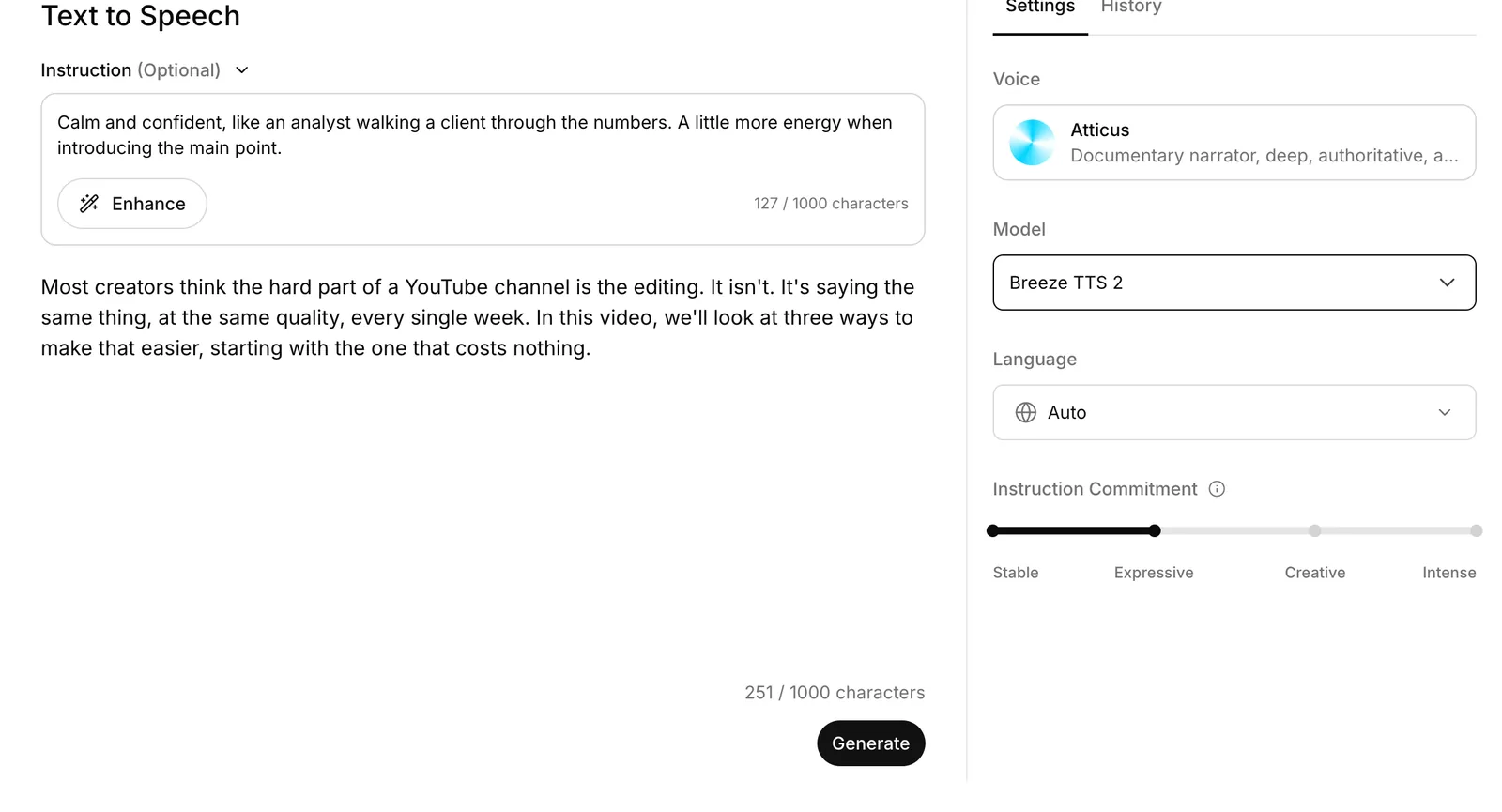
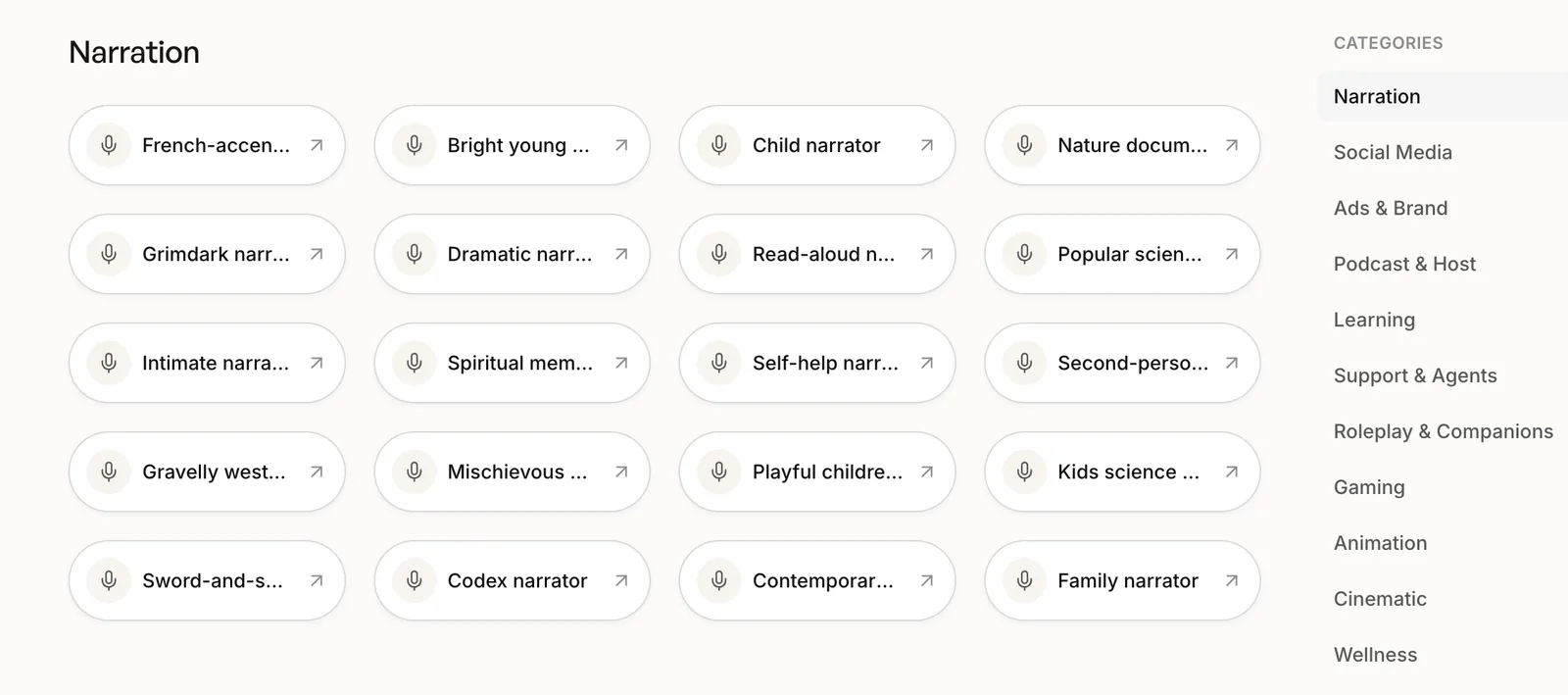
Choose the narrator. Browse the Voice Library by category, or bring your own identity with voice cloning or a designed voice. Audition two or three candidates with the same paragraph so you compare voices, not scripts.
Direct the delivery. Add an instruction that describes tone, energy, pacing, and persona. Keep it to one or two sentences. This instruction becomes part of your channel's style guide.
Generate and listen critically. Play the result at the volume your viewers use. Check names, numbers, and the sentence you were least sure about. Adjust the instruction or the Instruction Commitment control before touching the script.
Edit it into the video. Export the take, drop it on the timeline, and cut visuals to the narration rather than the other way around. Duck the music under the voice and leave a beat of silence before each new section.
Revise by regenerating, not re-recording. When a fact changes or a line lands badly, edit the text, regenerate that segment, and replace it. The voice, energy, and level stay identical to the rest of the take.
How to choose the right AI voice for your channel
The voice is a promise about the channel. A finance channel narrated by a giddy, breathless voice reads as untrustworthy no matter how good the research is; a true-crime channel with a chirpy tutorial voice feels wrong in the first ten seconds. Match the voice to the promise before you think about anything else.
The table below is a starting point. Treat the direction column as a first draft of the instruction you will refine in the next section.
| Channel type | What the voice needs | Direction to try |
|---|---|---|
| Tutorials and how-to | Clear, patient, unhurried; friendly but not performative | Explain like a helpful colleague, at a steady pace, with a short pause after each step. |
| Finance and business | Grounded, credible, measured; low energy, high authority | Calm and confident, like an analyst walking a client through the numbers. |
| Documentary and history | Warm, authoritative, with deliberate pacing and room for gravity | Measured documentary narration with subtle dramatic tension and long, natural pauses. |
| Tech reviews | Conversational, curious, quick; opinion is part of the format | Modern and conversational, like an expert explaining something to a friend, with more energy on the main feature. |
| Storytelling and true crime | Intimate, controlled, able to build and release tension | Start restrained and quiet, then gradually build intensity toward the reveal. |
| Kids and learning | Bright, kind, expressive without being loud | Warm and encouraging, slightly slower than normal, with clear emphasis on new words. |
| Motivation and self-improvement | Sincere, forward-leaning, rhythmic | Earnest and steady, building momentum through the final lines without shouting. |
| Product demos and onboarding | Professional, precise, brand-neutral | Polished and clear, like a product walkthrough for a first-time user. |
The BreezeBlue Voice Library is organized around exactly these jobs. Its Narration category alone holds everything from bright young narrators and nature-documentary voices to grimdark, dramatic, and read-aloud styles, alongside categories for social media, learning, ads, podcasts, gaming, and animation. Filter by the type of content you make, listen to the previews, and shortlist voices before you write a single instruction.
Direct the performance in plain language
Choosing a voice decides who is speaking. Direction decides how they speak, and it is where AI narration either sounds professional or does not. With Breeze TTS 2, direction is a short natural-language instruction attached to the script, the same way you would brief a narrator in the booth.
Good instructions describe four things: the tone, the energy, the pacing, and, when it helps, a persona the voice can inhabit. Keep them concrete and short. "Sound good" is not a direction; "calm, authoritative, deliberate pacing" is.
Technology review
Confident and conversational, like an expert explaining something to a friend. A little more energy when introducing the main feature.
History documentary
Measured documentary narration. Authoritative, warm, with deliberate pacing and subtle dramatic tension.
Software tutorial
Speak patiently and clearly, slightly slower than normal, with a natural pause before each step.
Story reveal
Start quiet and restrained, then build intensity sentence by sentence toward the reveal.
Two further controls shape individual moments. Bracket cues such as [sigh], [giggle], or [sob] can be placed inside the script to color a single beat without changing the whole instruction. The Instruction Commitment control sets how far the voice commits to your direction, from a stable, grounded read to an intense, expressive one. For most YouTube narration, a stable or expressive setting is right; push further for character-driven storytelling.
Direction only works if the model actually follows it while keeping the voice recognizable. On the open Voice Direction Benchmark, evaluated in August 2026, Breeze TTS 2 scored 4.25 out of 5 across nine control axes including emotion, intent, and accent, while holding speaker similarity at 0.67. In practice that means the narrator you chose still sounds like the narrator you chose after you ask for tension, warmth, or restraint.
Keep one recognizable voice across every video
Library voices are shared by many creators. That is fine for most formats, but channels that want a voice viewers associate with them alone have two options, and both remove the dependency on anyone's recording schedule.
Voice cloning turns a short, clean reference recording into a reusable AI voice. Creators who already narrate their own videos can keep their identity while producing far more content, and can regenerate lines in their own voice long after the original session. Clone only voices you have the rights to use: your own, or one whose owner has agreed in writing. Learn how voice cloning works.
Voice design creates an entirely new narrator from a text description of character, age, tone, and vocal qualities, with no source audio at all. It is the fastest way to give a faceless channel a signature voice that no other channel has. See how voice design works.
Whichever route you take, save the voice, pair it with your standard instruction, and use that pair for everything the channel publishes. Consistency is the feature; the tool is just how you keep it.
Long videos, multiple speakers, and channels at scale
A two-minute short and a forty-minute documentary need different tooling. Short scripts are comfortable in the Text to Speech editor: paste, direct, generate, export as WAV. Long scripts and multi-voice scripts belong in Studio, BreezeBlue's long-form workspace, where a script is split into segments that each carry their own voice and direction, any segment can be regenerated on its own, and the finished project exports as one track.
That segment-level control is what makes long-form narration maintainable. When a chapter of a course changes, or a product interface is redesigned, you replace the affected segments and leave the rest of the recording untouched, which is impossible with a human session.
Teams running several faceless channels, agencies producing for multiple clients, and e-learning departments maintaining large libraries usually get there and then want automation: scripts arriving from a spreadsheet, narration generated on a schedule, audio dropped into an edit pipeline. The same voices and instructions are available through the Developer API, SDKs, and CLI, so the pipeline you build in the browser can be reproduced in code without changing how the channel sounds.
One caution for scale: automate generation, not judgment. Someone should still listen to every video before it goes live. The tools remove the recording session, not the editor.
AI voice-overs and YouTube's rules
AI narration is allowed on YouTube, and channels built on it are monetized every day. What the platform's monetization policies penalize is content that is mass-produced or repetitive with little original value, regardless of whether a human or a model read the script. The practical bar is the same one that applies to any channel: original research, a real point of view, editing that serves the viewer, and narration that fits the video rather than being pasted over it.
A few habits keep a channel on the right side of the line. Disclose synthetic media where YouTube asks you to, particularly when a realistic voice or likeness could be mistaken for a real person or event. Clone only voices you have the rights to use. Add captions, both for accessibility and because they help search. And review YouTube's current policies rather than relying on a blog post, since the rules are revised regularly.
Used this way, AI voice-over is not a way around the platform's standards. It is a way to meet them more often, because time you are not spending in a recording booth is time you can spend on the research and editing that viewers actually reward.
Create your next YouTube voice-over with BreezeBlue
YouTube narration has moved from "text to speech" to something closer to directed performance. You choose a narrator for the channel, describe how each scene should be delivered, keep that voice consistent across every upload, and fix a line by regenerating it instead of recording again.
BreezeBlue brings those pieces together in one place: Text to Speech for scripts, a Voice Library organized by the content you make, voice cloning and voice design for a signature narrator, Studio for long-form and multi-voice projects, and a Developer API for automation. It is free to start, with paid plans for creators and teams that publish at volume.
Frequently asked questions
Can I monetize YouTube videos that use an AI voice-over?
Yes. YouTube's monetization policies do not prohibit AI narration. They penalize mass-produced or repetitive content with little original value, so a channel that uses AI voice-over for original, well-edited videos is treated like any other channel. Follow YouTube's disclosure requirements for realistic synthetic media and review its current policies before you launch.
Which AI voice is best for a faceless YouTube channel?
The one that matches the promise of the channel. Finance and documentary formats suit grounded, measured narrators; tech and review formats suit conversational, energetic voices; story formats suit intimate voices that can build tension. Shortlist two or three voices from the Narration category, generate the same difficult paragraph with each, and choose by ear. For a voice no other channel has, design one from a text description.
Can I use my own voice for AI narration?
Yes. Voice cloning creates a reusable AI voice from a short, clean reference recording of you, so you keep your identity while producing far more content and can regenerate lines in your own voice at any time. Only clone voices you own or have written permission to use.
How do I make an AI voice sound less robotic?
Three things matter most. Write the script the way people speak, with short sentences and contractions. Add a one-sentence instruction describing tone, energy, and pacing instead of relying on a default read. Then use bracket cues for individual moments and adjust the Instruction Commitment control if the delivery is too flat or too much. Most "robotic" results come from an undirected voice reading text written for the eye.
What audio format do I get, and how do I add it to my video editor?
Narration generated in Text to Speech and Studio downloads as WAV, which every video editor imports directly. Drop the file on an audio track, cut your visuals to the narration, and lower the music bed under the voice. If a line changes later, regenerate just that segment and replace it on the timeline.
Does AI voice-over work for YouTube channels in languages other than English?
Yes. Breeze TTS 2 Multilingual supports 51 languages, and the same voice and direction workflow applies. Choose a voice made for your language, write the instruction in that language, and audition the result in the same workflow you would use for English.